back | index
| load
frames
Creating a SCAP for
100% affiliate payments
When creating a new Package you will see this new
option:

Affiliates who belong to the affiliate group
you'll specify and have paid for a 100% SCAP can get payments through their Paypal
address.
There is special link in your affiliates'
menu:
"Your payment processor"
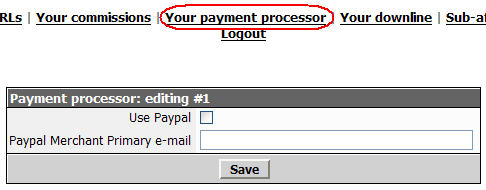
If an affiliate belongs to an affiliate group
that allows full payments by the affiliates then s/he (affiliate)
can check the "Use Paypal" box and include his/her email address.
This way, your customers will pay your affiliate and then return
back to your site for downloading the product.
If an affiliate does NOT belong to an affiliate
group that allows full payments by the affiliates then s/he see a
relevant message when clicking that option inside the affiliate's
area.
Use your imagination and you'll see how powerful
this feature is... Especially if you resell products...
For such a SCAP to work you must
first make a Package available for 100% commissions
as mentioned above.
Then you must create a
SCAP - a Product your
affiliates have to buy in order to be moved to the
favored "Affiliate Group" and get the 100% defined
at "Grant Special Commission to the customer."
Again: If you define a
SCAP for 100% commissions then all affiliates that
belong to the favored "Affiliate Group" can include
their Paypal email address through their affiliate
account and receive 100% of the money for the Products
of the Packages included to that specific favored
"Affiliate Group."
So, once your affiliates order such a
SCAP:
-
they are moved to the favored
Affiliate Group, and
-
get 100% commissions (more
precisely: 100% payments) INSTANTLY to their Paypal
account.
If you relate a membership (as a
Digital Delivery) with such a SCAP then your affiliates
will get that "commission" for as long they can access
the protected area defined.
If you relate a Paypal subscription
(as a Digital Delivery) with such a SCAP then your
affiliates will get that "commission" for as long their
subscription is valid. If their subscription expires or
be cancelled then their SCAP ends too.
If you relate a membership (as a
Digital Delivery) AND a Paypal subscription you can use
something like 999 days for the duration of the
membership and have the SCAP expired when the
subscription expires or cancelled.
If you create a SCAP and use any
other delivery method, say an encrypted downloading URL
or just instructions, then there will be no ending date
for that SCAP.
Remember: If you offer such a
service do NOT use any other payment gateway other than
Paypal for the specific Products included to the
Packages offered for 100% payments.
Example
-
Create 2 Affiliate Groups:
-
ALL
-
SUPER
-
Select BOTH groups when creating
a Package.
-
Create a SCAP.
-
Affiliates that pay for that SCAP
would be moved to SUPER.
-
Assign a monthly membership
through Paypal for that SCAP.
-
Also assign a membership with
9999 as duration for offering any special
instructions to your special affiliates through that
protected area.
Here is what will happen:
The same example can work with a
normal SCAP.
Also
Remember:
Need more help? Use
www.TurboHelpDesk.com
|
