back | index
| load
frames
SCAP - Special Commission As a Product
For information on how to
create a SCAP for 100% affiliate payments
click here.
You can create a "Special
Commission" as a Product and sell an upgrade option to your
affiliates for receiving higher commissions for the Packages added
to a specific affiliate group. This section is included when
creating a product.

You can define the affiliate
group to which the affiliate will be moved upon the completion of
payment and also the affiliate group to move the affiliate when the
assigned membership (if any) expires.
So you can create a Product/SCAP and say that:
-
Affiliates will get 95% (Grant Special
Commission to the customer.)
-
Affiliates will be moved to affiliate group
"special" upon payment.
-
Affiliates will be moved to affiliate group
"ALL" upon expiration of their membership OR subscription.
A SCAP must be viewed as another Product.
You can define a price for a SCAP and choose the delivery option as
with ANY product:
If you define a membership/protected folder,
JVManager will create that directory on your server and distribute a
username and password to your affiliate/customer.
The access of the
customer to that folder is defined in the "Digital Delivery:
membership" => "Duration of membership in days (if that applies)"
- see below:
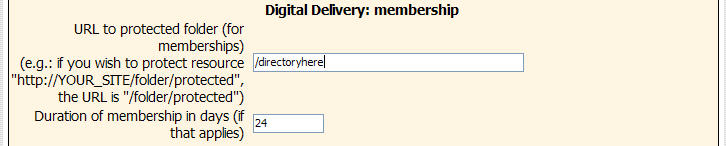
So, if you create a SCAP (as in the example
above) and define http://www.yourserver.com/directoryhere as the
members' area for your affiliates/customers here, and also define
'24' for the duration of this membership here is what will happen:
-
Affiliates will get 95% (Grant Special
Commission to the customer.)
-
Affiliates will be moved to affiliate group
"special" upon payment.
-
Affiliates can access the members' area at
http://www.yourserver.com/directoryhere
-
Affiliates will be moved to affiliate group
"ALL" 24 days after the day of their order and cannot access the
members' area at http://www.yourserver.com/directoryhere
Another way you can deal with a SCAP is to create
a Paypal(R) subscription. Study the image:
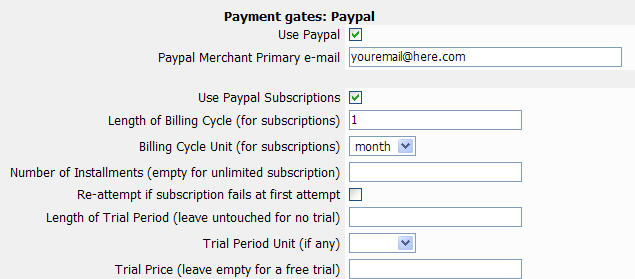
You can relate a membership with this
subscription or not. If you relate a membership then you'd include
something like 999 for the duration of the membership.

Continuing our example, if you create a SCAP (as
in the examples above) and define http://www.yourserver.com/directoryhere
as the members' area for your affiliates/customers here, also define
'999' for the duration of this membership AND ALSO create a Paypal
monthly subscription, here is what will happen:
-
Affiliates will get 95% (Grant Special
Commission to the customer.)
-
Affiliates will be moved to affiliate group
"special" upon payment.
-
Affiliates can access the members' area at
http://www.yourserver.com/directoryhere
-
Affiliates will be moved to affiliate group
"ALL" and thus will not be able to access http://www.yourserver.com/directoryhere
999 days after the day of their order OR on the day they will
cancel their Paypal subscription.
You can also create a specific subscription - say
for 12 months following the instructions above. Affiliates can
access the members' area and their higher commissions will be
applied for 12 months - no matter of the indication of 999 days in
the membership.
Lastly, you can just create a SCAP and assign a
subscription WITHOUT a membership. Affiliates/customers of that SCAP
will be credited with higher commissions for as long their Paypal
subscription is running.
Need more help? Use
www.TurboHelpDesk.com
|
