back | index
| load
frames
How to create a MySQL database (cpanel)
(wait until all images are loaded)
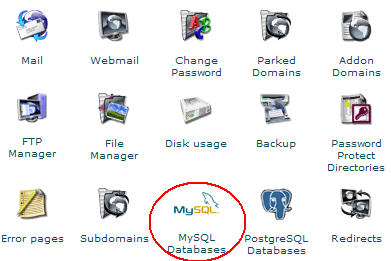
1. Click the icon "MySQL Databases"
2. Scroll the next screen down and find the "Add Db" button. Insert "jvmanager"
and click that button.
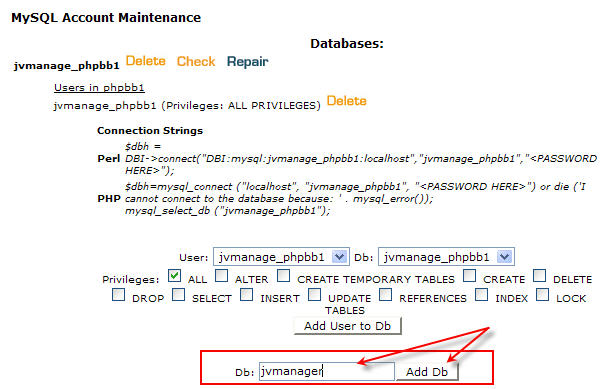
That's it.
If you cannot create a new database, you can use an existing one. JVM
will use a jvm_ and minima_ prefixes for the tables it needs, so
there will be no intervention with your existing ones.
Normally the databases in CPanel are titled:
- either yourdomainname_databasename
- or yourhostingusername_databasename
So if your domain name is youserver.com and your username for accessing your
control panel is yourusername, the new database will have one of the following
titles:
- yourserver_jvmanager
- or yourusername_jvmanager
Check your CPanel documentation for more information.
As for your MySQL username and password, normally they are the
same with the username and password you use to access your CPanel through the
web.
Need more help? Use
www.TurboHelpDesk.com
|
