You can use StormPay.com for getting orders and also subscriptions.
Check the "Use StormPay" box and include your " Merchant E-mail "
If you want to get subscriptions for a Product check the "Use StormPay Subscriptions" box and fill the rest of the details.
The interface for StormPay's subscriptions is the same as with StormPay's, so if you know how to setup a StormPay subscription you know how to set up this one too.
Subscriptions
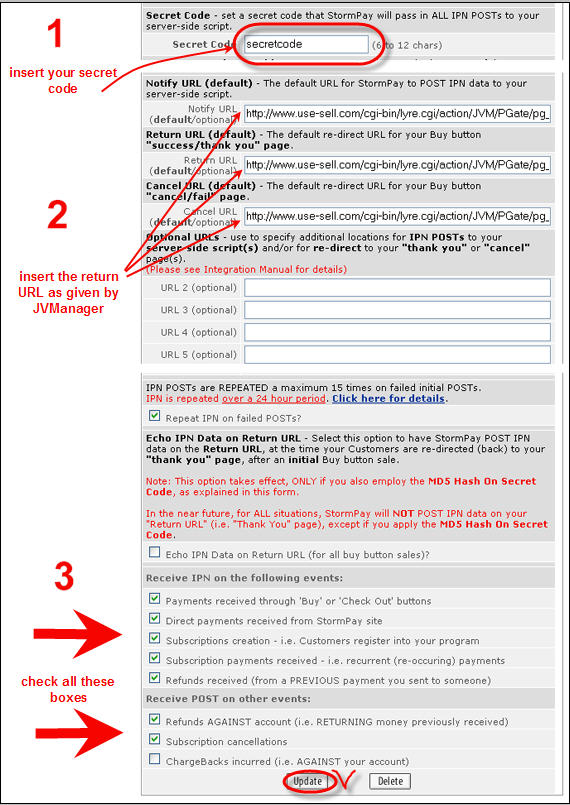
You must setup StormPay to work with JVManager for your recurring subscriptions. Here is what to do:
1. Login to your account at StormPay.com
2. Click Profile/Setup
3. Click "IPN Configuration"
4. Check the following:
- Make sure "Status" is checked to "Active"
- In the URL field (Notify URL & Return URL) insert the code provided by JVManager
- Be sure all the following boxes are checked:Receive IPN on the following events:
Payments received through 'Buy' or 'Check Out' buttons
Direct payments received from StormPay site
Subscriptions creation - i.e. Customers register into your program
Subscription payments received - i.e. recurrent (re-occuring) payments
Refunds received (from a PREVIOUS payment you sent to someone)Receive POST on other events:
Refunds AGAINST account (i.e. RETURNING money previously received)
Subscription cancellationsOnce done click the "Update" button. Done.
For your convenience here is a screen shot that will help you to setup your account at StormPay.com