back | index
| load
frames
How to Install JVManager
Your server must have activated the following PERL modules:
If you are NOT sure do ask your hosting provider first and only then install
JVM. You can send this message for asking your hosting provider to install those
modules:
~~~~~~~~~~~~~~~~~~~~~~~~~~~~~~~~~~~~~~~~
Hello!
Could you please install the following modules to my account?
Date:Calc
Crypt::SSLeay
Many thanks in advance!
~~~~~~~~~~~~~~~~~~~~~~~~~~~~~~~~~~~~~~~~
Next:
- Upload the installation script into your
/cgi-bin
folder.
- CHMOD
755 (make it executable).
- Then run it through your browser and insert the information required.
Example:
Type: http://WWW.YOURSERVER.COM/cgi-bin/INSTALLATION-CGI-FILE-NAME-HERE.cgi
in your browser and you'll see the installation form.
Follow the instructions:
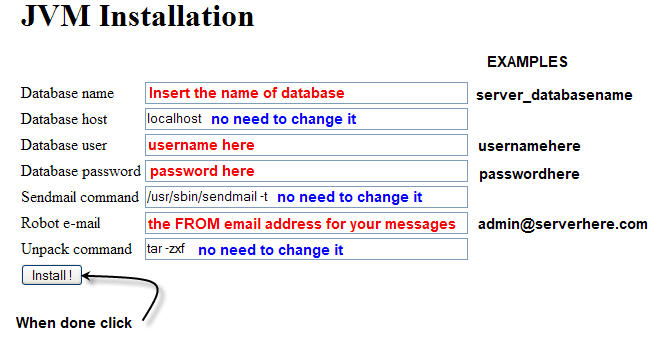
The "Robot e-mail" is the email address where JVM will send all notification
(for orders, registrations, etc.)
Need more help? Use
www.TurboHelpDesk.com
|
